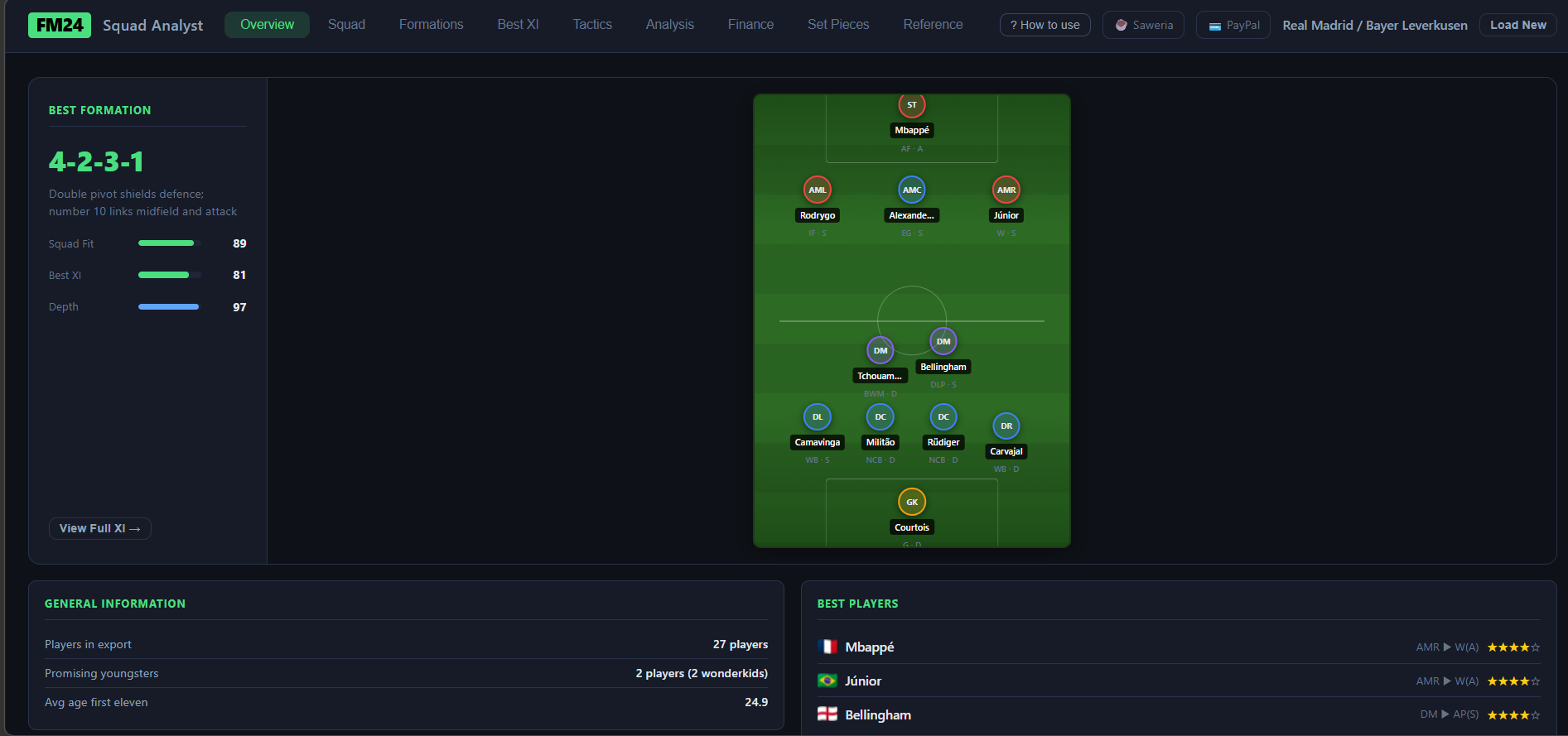
Every Football Manager save eventually hits the same wall: you've got a squad full of players, a transfer window just closed, and you're staring at a spreadsheet trying to figure out which formation actually fits what you have. FM gives you the data — but not the answer.
That's why I built FM Squad Analyst.
What Is It?
FM Squad Analyst is a browser-based tool — no installation, no server, no account required. Export your squad from FM2024 as an HTML file, drag and drop it into the tool, and you're done.
Everything runs locally in your browser. No data leaves your machine.
What It Does
Formation Recommendations

The tool scores every built-in formation against your squad by evaluating how well your players fit each role and duty slot. Formations are ranked so you can see at a glance which system your squad is actually built for — not which one you wish it was built for.
Best XI Picker

A greedy assignment algorithm walks through every formation slot and assigns the best available player based on role suitability scores. Supports two modes: All Players (full squad) and Available Only (excludes anyone flagged as Injured, Suspended, Ineligible, Unregistered, or Ill).
Tactical Balance System

This is the part I'm most proud of. Beyond raw scores, the tool evaluates your Best XI against 22 tactical principles — things like two Registas in midfield, a Poacher with no creator, Attack-duty overload, mismatched winger/fullback pairings. Violations apply a penalty to the formation score, and the system picks whichever XI (greedy or balance-adjusted) scores higher after penalty. The Tactics Builder also shows live warnings as you configure roles.
Tactics Builder

Build your own custom formation, assign roles and duties per slot, and see the ranked candidates for each position in real time — complete with the live tactical warnings panel.
Squad Analysis Age profile chart, position coverage grid, and per-player role suitability breakdown across your entire squad.
Role Reference A searchable, filterable reference card for every role and duty in the game — key attributes, preferred attributes, and full-name tooltips. Useful if you're still building your tactical vocabulary.
How to Use It
- Download
squad_views.fmffrom the tool page - In FM2024, go to Preferences → Import and import the file
- Activate the imported view on your Squad screen
- Click the menu icon (☰) → Print → save as Web Page
- Open the tool and drag & drop the saved HTML file
That's it.
Under the Hood
Entirely static — plain HTML, CSS, and vanilla JavaScript. No framework, no external
dependencies, no build step. The deployed app is just index.html, app.js, style.css,
and a data/ folder containing role attribute references.
Try It
FM Squad Analyst is free at qz-hendrik.com/fm.
If it helps your save, consider supporting the project on Saweria (if you're from Indonesia) or PayPal — it keeps future features coming.